
Server Side Tracking: Why Your Website Needs It in 2025
Server-side tracking is no longer an optional upgrade; it’s a business-critical foundation for paid marketing, accurate attribution, and long-term ad performance. In this article, we break down the what, why, and how of Server-Side Tracking, explain the practical gains you can expect, and give a step-by-step checklist for implementation. This guide is based on the Bright Commerce podcast episode “Server-Side Tracking: Why Your Website Needs It in 2025” and expands the conversation with concrete recommendations, tooling, and testing tips.
Table of Contents
- What is Server Side Tracking?
- Why Server Side Tracking matters in 2025
- How Server Side Tracking works (technical overview)
- Tools and vendors: Stape, Meta CAPI, and options
- Quantified benefits and case studies
- How to Implement Server-Side Tracking: A Practical Checklist
- How to verify your Server Side Tracking setup
- Common agency mistakes and ownership pitfalls
- Ownership and data governance
- Frequently Asked Questions (FAQ)
- Conclusion: A practical stance on Server Side Tracking
- Final note
What is Server Side Tracking?
Server-side tracking is a method of collecting website and campaign event data where the data points (pageviews, form submissions, purchases, etc.) are sent from your server-side environment to analytics and ad platforms rather than relying entirely on browser-based tracking (cookies, client-side pixels, and JavaScript tags). In practice, Server Side Tracking adds a server container or “middle layer” that receives event data from your site and forwards that clean, consent-compliant data to platforms like Google Analytics, Meta (Facebook), TikTok, and others.
Why emphasize Server-Side Tracking? Modern privacy controls, browser restrictions, and client-side blockers have made traditional client-side data capture less reliable. Server-side tracking gives you a more accurate, resilient, and auditable data stream that ad platforms can use for machine learning and conversion optimization.

Why Server-Side Tracking Matters in 2025
The marketing stack continues to shift toward machine-learning optimized ad products. Those systems all depend on reliable event data. Unfortunately, the data available from client-side tracking has been steadily eroded by three major forces:
- Privacy and platform changes (e.g., Apple’s app tracking transparency and Safari Intelligent Tracking Prevention)
- Legal consent regimes (GDPR in the EU, CCPA/CPRA in California, and similar laws globally)
- Client-side ad- and script-blockers that prevent pixels and cookies from firing
Server-side tracking mitigates these gaps. By routing event data through a server container you control, you can forward critical conversion signals to ad platforms in a way that is more resilient to blockers and better aligned with consent policies. If your campaigns are underperforming and conversions look low despite heavy spending, missing server-side data is a likely culprit.
Privacy vs. Performance: how Server-Side Tracking fits.
Server-side tracking does not bypass consent. In fact, it should respect and enforce the same consent signals as client-side tools. The point is not to collect data secretly; it’s to ensure the data you are allowed to collect is captured accurately and delivered to platforms reliably. Properly implemented, Server Side Tracking gives you:
- Better attribution accuracy
- Higher conversion capture for paid ads
- Cleaner, auditable event logs for compliance and debugging

How Server Side Tracking Works (Technical Overview)
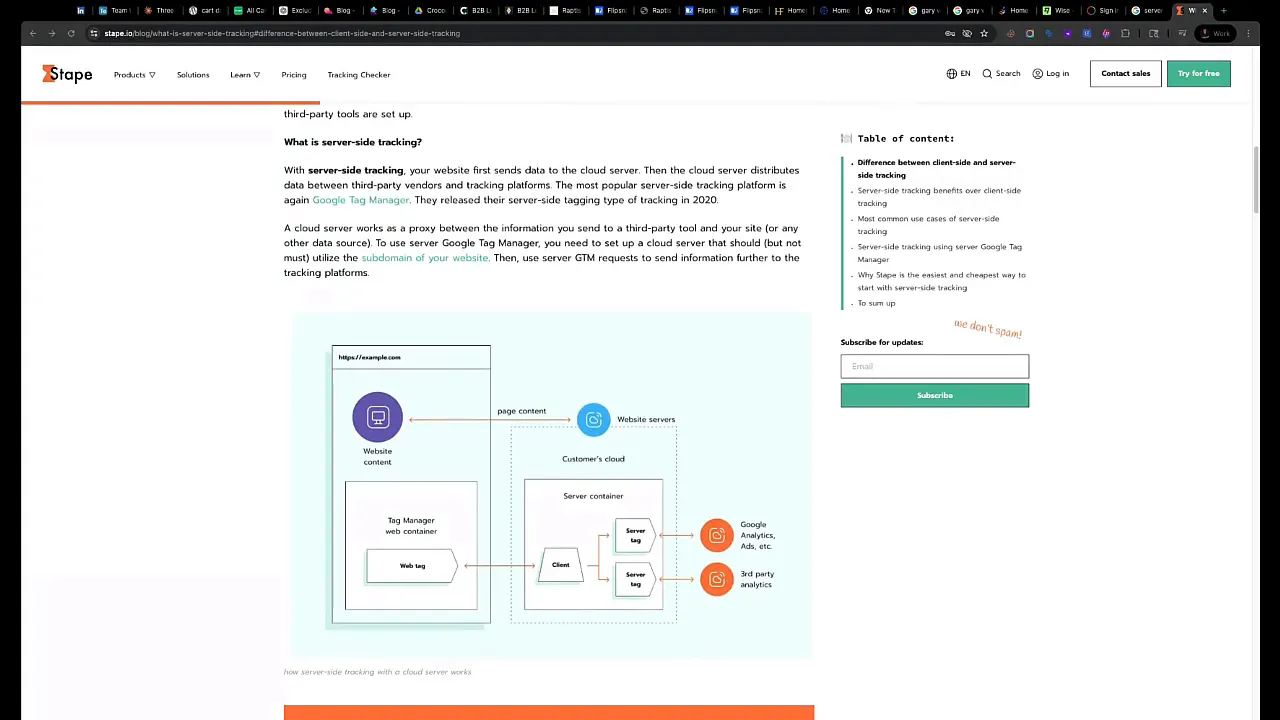
At a high level, Server Side Tracking adds a server container between your website and external analytics/ad platforms. Here’s the flow:
- The visitor interacts with your site (page view, form submit, add to cart, purchase).
- Client-side JavaScript pushes structured events into a data layer.
- Instead of sending those events directly to third-party pixels, your site sends them to your server-side container (your server or a managed service).
- The server-side container forwards the events to analytics and ad platforms (Google Analytics, Meta Conversion API, TikTok, etc.), optionally enriching the payload with hashed identifiers and server-only fields.
This approach reduces reliance on client-side cookies and mitigates issues from blockers. The server-side layer can also centralize event validation, deduplication, and consent checks.
Key components you’ll see in a Server Side Tracking setup
- Web container (GTM or equivalent): the client-side tag manager and data layer.
- Server container (GTM Server or a hosted alternative): the middle layer that receives events.
- Event map & variables: data layer variable names, triggers, and mapping that determine what’s sent.
- Third-party endpoints: Google Analytics Measurement Protocol, Meta Conversion API, TikTok server endpoints, etc.
- Consent management: CMP integration so events are only forwarded when consent allows.
Tools and Vendors: Stape, Meta Capi, and Options
There are two common approaches to Server Side Tracking:
- Self-hosted server container (you or an agency builds and runs it on a cloud provider).
- Managed server-side tracking vendors (easier, less maintenance).
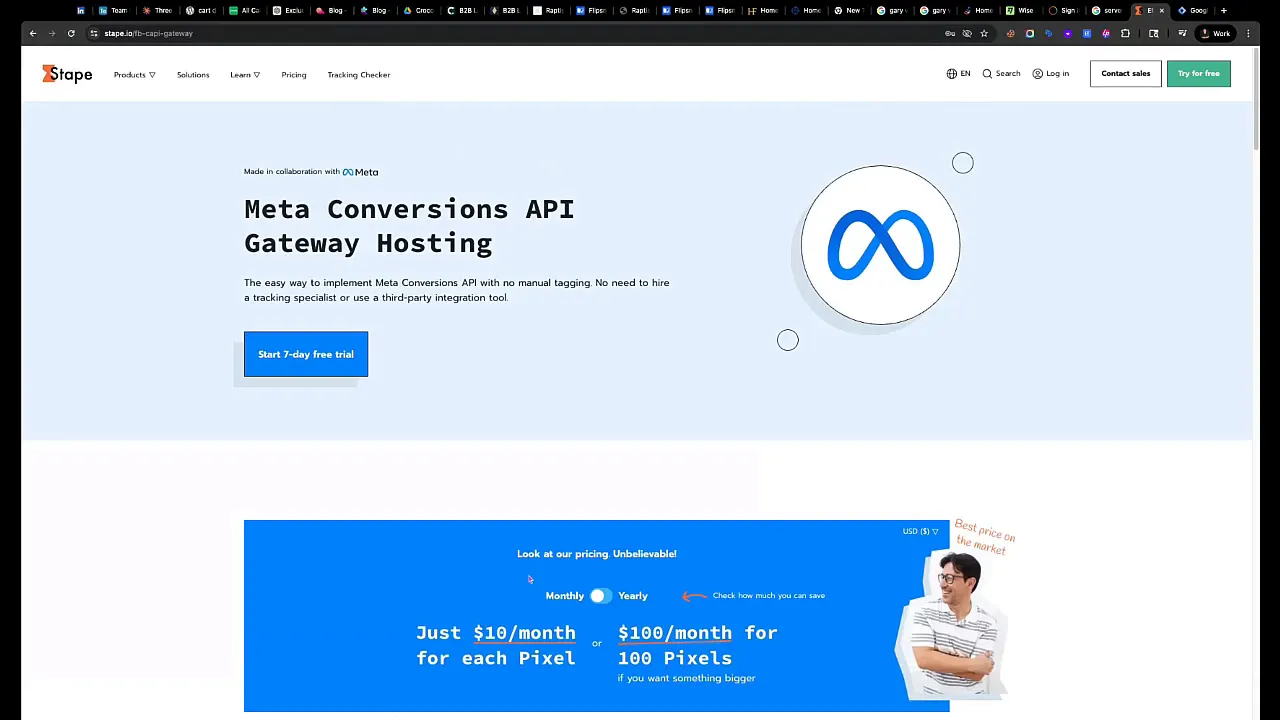
Practitioners often mention managed options like Stape (stape.io), which offers pre-built server containers and solid documentation. Stape supports multiple platforms, such as Meta, TikTok, Snapchat, and Google, and is often recommended for quick setups.
Meta (Facebook) also provides the Meta Conversion API (CAPI) for server-to-server event forwarding. Many teams enable Meta CAPI as an immediate win because it plugs directly into Facebook’s learning systems and dramatically improves event capture for Facebook campaigns.
When to choose managed vs. self-hosted
- Choose managed (Stape) if you want speed, low maintenance, and predictable pricing for a few sites.
- Choose self-hosted if you have many domains, need advanced customization, or want to centralize a single server container for 20-50+ sites (saves costs at scale).
Quantified Benefits and Case Studies
The difference between client-side-only tracking and a solid server-side tracking implementation shows up in conversion capture, attribution, and ROAS. Numbers gathered by agencies and platforms indicate substantial gains:
- Tracklution: 30-40% more conversions were reported after a proper server-side tracking implementation.
- Admetrics: documented DTC brands “tripled” conversions within weeks after moving to server-side tracking.
- Meta case studies: observed up to a 60% lift in ROAS after implementing server-to-server event forwarding.
- Stape reports: 22% increases in conversions and improved data accuracy (90% accuracy claims on some clients).
These results aren’t magical; they reflect more complete event capture, better signal deduplication, and more reliable ad platform machine learning inputs. When you give platforms richer, server-validated data, their optimization models perform better.
How to Implement Server-Side Tracking: A Practical Checklist
Below is a practical, step-by-step checklist that combines the podcast discussion with industry best practices. Use it to scope an initial Server-Side Tracking rollout.
Pre-implementation: planning & governance
- Inventory tracking: list all conversion events (form submit, purchase, lead, phone click).
- Define ownership: designate who owns servers, GTM containers, and analytics accounts. Own your data without an agency hosting essential controls under their account.
- Consent strategy: integrate your consent management platform (CMP) with client and server layers.
- Determine the hosting approach: Manage vendor (Stape) vs. self-hosted (GTM Server on GCP/Azure/Cloudflare).
Implementation steps
- Set up a server container (GTM Server or a managed Stape container).
- Configure your web container (GTM Web) to send events to the server container rather than directly to third-party pixels.
- Define a data layer standard across pages and events (consistent variable names and payload formats).
- Implement data-layer pushes for all conversion events and ecommerce interactions.
- Map server container tags to each platform: Google Measurement Protocol, Meta CAPI, TikTok Server, etc.
- Enable deduplication: ensure client and server signals are deduped to avoid double-counting.
- Hash PII where required (emails, phone numbers) before sending to ad platforms, following each platform’s requirements.
- Test end-to-end: trigger events, verify reception in server logs, and confirm platform receipt (Conversions in Meta, debugging in GA4).
Post-implementation
- Monitor daily event flows and error logs for dropped events.
- Set alerts for sudden drops (e.g., missing conversions). The podcast mentioned a script that reports broken Google goals each morning; build or adopt similar monitoring.
- Audit ad performance for expected lifts and attribution changes; allow a 1-4 week learning window for machine learning models to re-optimize.

How to Verify Your Server-Side Tracking Setup
If you suspect your campaigns aren’t using server-side signals, here are quick ways to check:
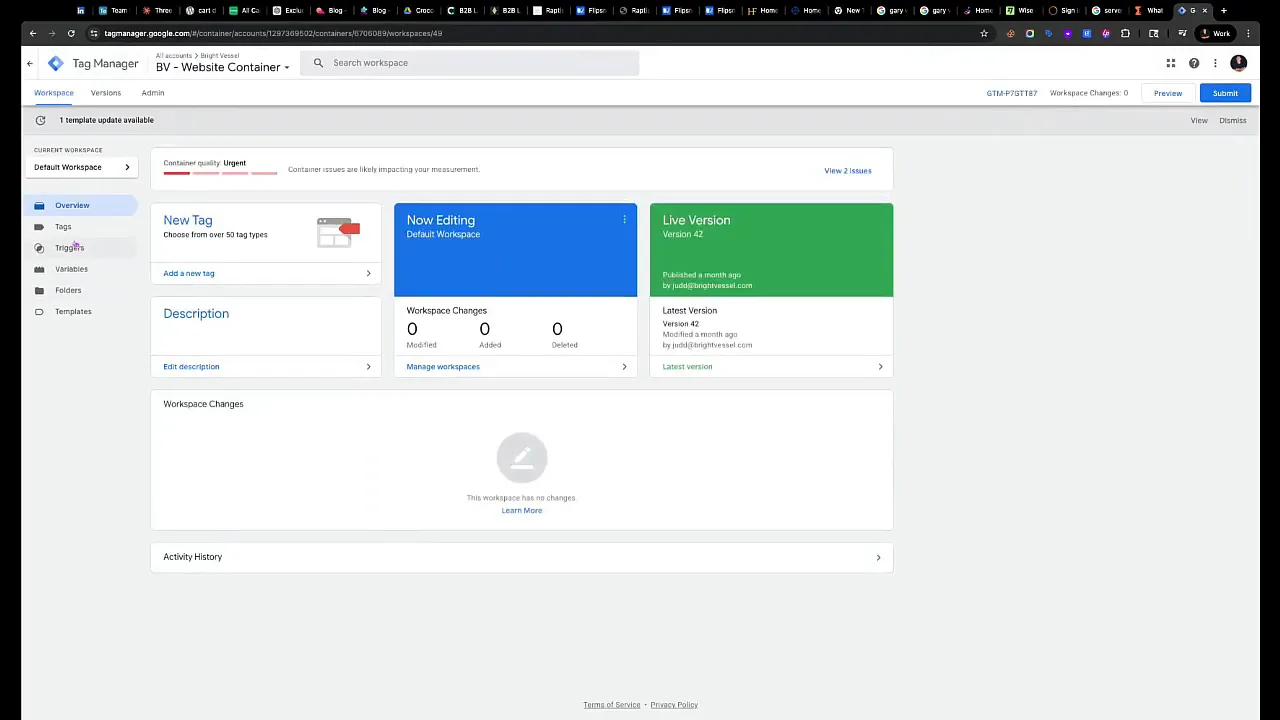
- Google Tag Manager: Look for two containers, a Web container and a Server container. If you only see one container, that’s a red flag.
- Server logs: Confirm the server container receives events (requests to your server endpoint).
- Platform dashboards: For Meta, check the Events Manager for events arriving via CAPI; for Google, verify hits in GA4’s DebugView or via Measurement Protocol logs.
- Use browser devtools to watch the network requests. Client-side pixels will show network calls to third-party endpoints, while server-side pixels will show calls to your server endpoint.
- Consent enforcement: test with consent turned off and on. Events should be blocked or forwarded appropriately per consent.
Common Agency Mistakes and Ownership Pitfalls
The podcast hosts highlighted a few common agency missteps. Avoid these traps:
- Not owning your server container: If an agency hosts the server container under its account and you switch vendors, you risk losing data continuity.
- Skipping consent: Forwarding data without user consent exposes you to compliance risk.
- Incomplete instrumentation: Missing data-layer variables or inconsistent naming lead to partial event capture and worse attribution.
- Overcomplicating early stages: Start with core events and add complexity only after the basics are reliable.
- Failing to monitor: No setup is “set and forget.” Platform changes and tag misfires happen; monitoring is essential.
Ownership And Data Governance
One consistent recommendation from the podcast: own your accounts and data. That means:
- Server container and analytics accounts should be in your organization’s cloud and GTM/GCP accounts.
- Agency or consultant access should be granted with the least privilege and controlled through role-based access.
- Maintain backups of tag configurations and precise documentation of data-layer specifications.
When you own the Server-Side Tracking stack, you control continuity, auditing, and future migrations, which are critical if you ever change vendors or platform strategies.
Frequently Asked Questions (FAQ)
1. What exactly does Server Side Tracking fix that client-side tracking can’t?
Server-side tracking reduces data loss caused by browser restrictions, ad blockers, and cookie blocking. It centralizes event collection on a server you control and forwards normalized events to ad platforms, improving conversion capture and attribution accuracy.
2. Is Server Side Tracking a privacy violation?
No. Server-side tracking is a method of routing events. Like client-side tracking, consent and privacy laws must be respected. Proper implementations enforce CMP signals and only forward data that users have allowed.
3. Should I rebuild my entire tag setup to use Server Side Tracking?
Not necessarily. Many teams begin by routing a subset of critical conversion events (for example, purchases and leads) to a server container and keeping others tracking client-side. You can migrate gradually.
4. How long does it take to implement Server Side Tracking?
As the podcast hosts mentioned, implementation can be done in an hour or a few hours with a managed vendor like Stape and a simple lead-gen site. For enterprise or multi-domain setups, plan a phased rollout over weeks.
5. Should I use managed hosting (Stape) or self-host?
Use managed hosting for speed and simplicity. Use self-hosting if you need a single server for dozens of sites or special compliance and customization requirements.
6. How much improvement should I expect?
Results vary, but many reports and case studies show 20–40% increases in captured conversions and notable ROAS lifts after moving to Server Side Tracking and server-to-server APIs like Meta CAPI.
7. Can I test Server Side Tracking without affecting my live analytics?
Yes. Validate before switching production traffic using staging environments, GTM previews, and platform debug views (e.g., GA4 DebugView, Meta Test Events).

Conclusion: A Practical Stance On Server-Side Tracking
Server-side tracking is not a trendy niche; it’s a necessary evolution of how we collect and deliver conversion signals to the platforms that power marketing. Between privacy shifts, browser restrictions, and the rise of machine-learning-based advertising, the gap between actual and captured conversions is only growing. Closing that gap requires a server-side layer you control, respecting consent and ensuring consistent event flows.
Server-side tracking should be on your priority list for 2025 if you are running paid campaigns. It improves conversion measurement, strengthens ad performance, and protects data ownership. Start small (core events), choose a hosting approach that matches your scale, and instrument monitoring so you can detect and fix issues quickly.
Bright Commerce’s podcast episode provides a practical, agency-minded view of the challenges and wins involved. If you want to dig deeper, consult the resources mentioned in the episode (Tracklution, Admetrics, Stape case studies) and consider training or consulting support if your team does not already have server-side experience.
Next steps:
- Audit your current tag setup and list all conversion events.
- Decide hosted vs. self-hosted Server Side Tracking based on scale and cost.
- Implement a staging server container and run tests using debug tools.
- Monitor event flow and add alerts for dropped conversions.
- Keep ownership in your org and document the data-layer schema.
Final Note
If you’re a marketer, product owner, or agency lead and haven’t prioritized Server-Side Tracking, consider this your prompt to act. The gap between your actual and reported conversions is likely larger than you think; Server-Side Tracking is the most reliable way to close it.
Want help auditing your current tracking and building a roadmap for Server-Side Tracking? Document your events, secure ownership of your containers, and start with a short pilot. The ROI for accurate tracking pays for itself quickly in improved ad efficiency.
For more insights and expert services, visit Bright Vessel and Bright Code.